Extending Seed
Seed Style provides us with an opportunity to extend Seed's macro language in sensible and expressive ways. For instance a common pattern to ensure completely centred content is the flex styled div:
div![
    s().display_flex()
        .flex_direction_column()
        .justify_content_center()
        .align_items_center(),"
    p!["This content is fully centered"]
]
We can atomize this common pattern enabling the following to be used instead:
center![
    p!["This content is fully centered"]
]
We can use this center "element" just like we would use a div! or anything else by creating a center! macro. We do this by simply annotating a view function with #[view_macro]:
#[view_macro]
fn center_view<Ms>(mut root: Node<Ms>, children: Vec<Node<Ms>>) -> Node<Ms> {
    root![
        s()
        .display_flex()
        .flex_direction_row()
        .justify_content_center()
        .align_items_center()
        ,
        children,
    ]
}
Care must be taken when deciding to extend Seed's syntax in this way. In this case the resultant mark up is only marginally cleaner at the expense of hiding the style implementation. For simple uses it is probably not that helpful.
Where it may come in useful is expressively declaring component UI elements. For instance we could create a card component with complex styling, behaviours, optional children and layout. This could can be rendered as simply as:
card![
    media![
        img![attrs! {At::Src => "public/dark.jpg"}]
    ],
    card_title![
        h1!["Dark"],
    ],
    subtitle![
        h2!["Season 3 - 26th June 2020"]
    ],
    description![
        r#"Throughout the series, Dark explores the existential implications of time
        and its effects upon human nature. Dark is the first ever German language Netflix
        original series. ("#,
        votes,
        " votes) ",
    ],
    actions![
        button!["Up", votes.on_click(|v| *v += 1)],
        button!["Down", votes.on_click(|v| *v -= 1)],
    ]
]
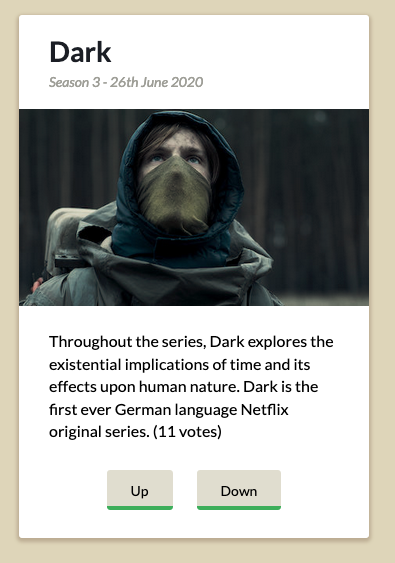
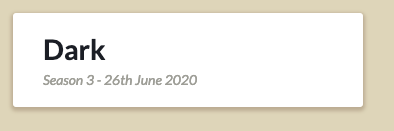
Because the procedural macro that generates this dsl allows optional arguments it means we can use the same macro in a more simpler way:
card![
    card_title![
        h1!["Dark"],
    ],
    subtitle![
        h2!["Season 3 - 26th June 2020"]
    ],
]
Notes:
- Apply the
#[view_macro]attribute macro to a view function to generate the dsl. - The view function should be suffixed with
_view. - The view function should be generic over the message type, use
Msfor this. - If this first argument is anything other than
rootor_rootthen this will be used as an options struct for the view. - The next argument should be
rootor_root. This provides access to the root element. - The next argument should be
childrenor_children. This enables explicit placement of child nodes in the view. - Use
root![]in the view function to be a stand in for the root. - Optional child views should have the type
Option<Node<Ms>> - All children of each sub-macro can accept anything that you might ordinarily use in Seed.
Example - A Flip Card Component
Let's say we want to create a customizable component that when clicked on it 'flips' to show alternative information. The CSS setup for this is fairly complex, with the mark-up verbose and easy to make a mistake when implementing. This is even true if making re-use of specific styles.
The final component can be used like this:
click_to_flip![
    front![
        "This is the front view"
    ],
    back![
        "This is the flipped view. There can be anything in here!"
    ]
]
And can be fully styled as desired:
This is the front view
This is the flipped view. There can be anything in here!
To create this re-usable component we write the following view function:
#[seed_hooks::topo::nested]
#[view_macro]
fn click_to_flip_view<Ms: 'static>(
    root: Node<Ms>,
    _children: Vec<Node<Ms>>,
    mut front: Node<Ms>,
    mut back: Node<Ms>) -> Node<Ms>
    {

    let flip = use_state(|| false);

    let card_face_style = s()
        .overflow_auto()
        .position_absolute()
        .height(pc(100))
        .width(pc(100))
        .backface_visibility("hidden");

    root![
        s().cursor_pointer().perspective("600px"),
        div![
            s().width(pc(100))
                .height(pc(100))
                .position_relative()
                .transition("transform 0.5s")
                .transform_style("preserve-3d"),
            if flip.get() {
                s().transform(" rotateY(180deg)")
            } else {
                s()
            },
            as_tag![
                div,
                front,
                card_face_style.clone()
            ],
            as_tag![
                div,
                back,
                card_face_style.transform("rotateY( 180deg )")
            ]
        ],
        flip.on_click(|f| *f = !*f)
    ]
}
The function signature's first argument is root therefore this view will have no configuration struct needed.
The second argument is _children, this indicates that direct child nodes of click_to_flip will be ignored. Only front![]
and back![] grouped nodes will be accepted. Both front and back arguments are mut because we want to directly update their styles.
let flip = use_state(|| false);
This set's up a state variable to control wether the component is flipped or not.
root![
    ...
]
We start the view with the root![] node because the user of the component may want to set certain styles on it. For instance
setting up the shadow and padding in the above example.
as_tag![
    div,
    front,
    card_style.clone()
],
Front and back nodes are handled with the as_tag![] macro, this allows us to change the tag used (if we want) for the front or back.
However in this case we are using it to update the style of the face.
flip.on_click(|f| *f = !*f)
Finally, this line sets up an event handler which changes the flip state on click.
Nesting custom markup
In fact, one even might really love the hideous orange blue version but consider writing the orange/blue card overly style verbose, especially if this card was going to repeated many times in an application. Therefore there is nothing to prevent this also being abstracted :
#[view_macro]
fn uglycard_view<Ms: 'static>(root: Node<Ms>, _children: Vec<Node<Ms>>, orange_side: Node<Ms>, blue_side: Node<Ms>) -> Node<Ms> {
    let card_style = s()
        .padding(px(32))
        .bg_color(seed_colors::Gray::No3)
        .radius(px(6));

    click_to_flip![
        s().width(px(300)).height(px(300)).my(px(24)),
        front![
            card_style
                .clone()
                .bg_color(seed_colors::Indigo::No4)
                .box_shadow("0px 0px 12px -1px rgb(127, 156, 245)")
                .w(pc(100))
                .h(pc(100)),
            blue_side,
        ],
        back![
            card_style
                .bg_color(seed_colors::Orange::No4)
                .box_shadow("0px 0px 12px -1px rgb(246, 150, 105)")
                .w(pc(100))
                .h(pc(100)),
            orange_side
        ]
    ]
}
Which can simply be used as follows ;) :
uglycard![
    orange_side![
        p!["This is the orange side!"]
    ],
    blue_side![
        p!["This is the blue side!"]
    ],
]
This is the blue side!
This is the orange side!
Optional Arguments
Sometimes one may wish to configure a custom component for use. For instance in the above example duration of the flip animation might be a user-settable value. Therefore it is sometimes useful for components to accept a number of optional arguments.
These can be set up by using a variable other than root or _root as the first argument to the view function:
struct ViewArgs {
    repeat : i32,
}

impl Default for ViewArgs {
    fn default() -> Self {
        ViewArgs {
            repeat : 1,
        }
    }
}

#[view_macro]
fn warning_view<Ms>(

    args: ViewArgs,
    root: Node<Ms>,
    children: Vec<Node<Ms>>) -> Node<Ms>{
    root![
        (0..args.repeat).map(|_|
            div![
                s().bg_color(seed_colors::Red::No6)
                    .color(seed_colors::Base::White)
                    .padding(px(12))
                    .margin(px(8)),
                children.clone()
            ]
        )
    ]
}
This can be used as follows:
warning![
    repeat = 4,
    "This is being repeated 4 times"
]
View Lists
Sometimes one may wish to allow multiple items within a custom component. For instance a ul tag can contain many li items.
We can handle this by simply making one of the view arguments accept Vec<Node<Ms>> instead of Node<Ms>.
#[view_macro]
fn todos_view<Ms>(

    root: Node<Ms>,
    _children: Vec<Node<Ms>>,
    complete: Vec<Node<Ms>>,
    incomplete: Vec<Node<Ms>>,

) -> Node<Ms>{
    root![
        complete.iter().map(|item|
            div![
                s().bg_color(seed_colors::Green::No6)
                    .color(seed_colors::Base::White)
                    .padding(px(12))
                    .margin(px(8)),
                item,
            ]
        ),
        incomplete.iter().map(|item|
            div![
                s().bg_color(seed_colors::Red::No6)
                    .color(seed_colors::Base::White)
                    .padding(px(12))
                    .margin(px(8)),
                item,
            ]
        ),
    ]
}
Which can be used as
todos![
    complete!["Buying a laptop"],
    complete!["Eating breakfast"],
    complete!["Watching Mr. Robot"],
    incomplete!["Paying the Bills"],
    incomplete!["Writing this guide!"],
]
Optional arguments to child nodes
It is also possible to have optional arguments to each labelled child block. In the previous example a different labelled block was used for a complete task and an incomplete task. Instead it might be better to have a general todo item, tagged with either complete if completed.
To use arguments in labelled blocks you just need to accept a tuple of the node and an argument struct. For instance:
struct ItemOpts {
    complete : bool,
}

impl Default for ItemOpts {
    fn default() -> Self {
        ItemOpts {
            complete : false,
        }
    }
}

#[view_macro]
fn todos_view<Ms>(
    root: Node<Ms>,
    _children: Vec<Node<Ms>>,
    item: Vec<(Node<Ms>, ItemOpts)>,
    ) -> Node<Ms>{

    root![
        item.iter().map(|(item, opts)|{
            div![
                s()
                    .color(seed_colors::Base::White)
                    .padding(px(12))
                    .margin(px(8)),
                if opts.complete {
                    s().bg_color(seed_colors::Green::No6)
                } else {
                    s().bg_color(seed_colors::Red::No6)
                },
                item,
            ]
        }

        ),
    ]
}
Which can be used as
todos![
    item!["Buying a laptop", complete = true],
    item!["Eating breakfast", complete = true],
    item!["Watching Mr. Robot", complete = true],
    item!["Paying the Bills"],
    item!["Writing this guide!"],
]
Use a child node in an expression
You may wish to use a named child node in an expression, for instance to programmatically adjust the child argument, this is perfectly fine. Note that each child macro name is scoped to the nearest view macro name.
todos![
    {
        let is_complete = use_state(||false);
        item![
            "Buying a laptop",
            complete = is_complete.get(),
            is_complete.on_click(|c| *c = !*c)
        ]
    },
    {
        let is_complete = use_state(||false);
        item![
            "Eating breakfast",
            complete = is_complete.get(),
            is_complete.on_click(|c| *c = !*c)
        ]
    },
    ...
    etc
]
Putting it all together
Using all of the above we can put together a UI component which is shows the number of votes a television show has scored and Awards won on the reverse of the card with this simple api.
showcard![
    votes = 1337,
    title!["Dark"],
    description![
        r#"Throughout the series, Dark explores the existential implications of time
        and its effects upon human nature. Dark is the first ever German language Netflix
        original series.
    "#],
    award![
        "Best Art Direction",
        awarding_body = "German Television Academy Awards(2018)",
    ],
    award![
        "Best Cinematography",
        awarding_body = "German Television Academy Awards(2018)"
    ],
    award![
        "Best Young Actor",
        awarding_body = "Golden Camera, Germany"
    ],
]
Dark
Throughout the series, Dark explores the existential implications of time and its effects upon human nature. Dark is the first ever German language Netflix original series.